

OnlyFans does not provide a universal download button for every video. That can be inconvenient for creators backing up their own uploads, agencies maintaining authorized client archives, or users who have separately received permission to keep an offline copy.
An OnlyFans downloader may help in those limited situations, but software is not permission. A subscription or purchase does not automatically transfer copyright or grant the right to redistribute a creator’s work. Before saving anything, confirm that the rights holder, applicable law, and the platform’s current terms allow it.
A local archive should begin with authorization and end with protected storage.
Quick Answer: Which Workflow Should You Choose?
- Chrome extension: best for one-off videos or images already visible in the browser.
- Windows or Mac app: better for long videos, larger queues, repeat work, and organized folders.
- Online downloader: convenient, but may send page addresses or media data to another server.
- Screen recording: simple in theory, but works in real time and may produce lower-quality or black-screen results.
For users choosing between Chrome and desktop workflows, OFDownloader provides both options. Its documented process is intended for content already accessible to the signed-in user. It is not designed to unlock unpaid media, enter private accounts, or authorize redistribution.
What to Check Before Choosing an OnlyFans Downloader
Access Boundary
The account should already be able to open and play the exact item. A username, copied link, or downloader cannot replace a subscription, completed purchase, or creator authorization.
Avoid products that advertise access to unpaid posts or private profiles. Never provide an OnlyFans password to an unrelated website.
Device and Workload
A browser extension is practical when the user is already viewing one post. A desktop application requires installation, but it is generally a better fit for repeat tasks, larger queues, and longer-running downloads.
Do not assume that “desktop” means every operating-system version. Check the current Windows and macOS requirements on the publisher’s official download page.
Privacy and Maintenance
Chrome extensions need page access to detect visible media and download permission to save files. Those permissions can be reasonable, but the package should come from an identifiable publisher.
Media platforms and browsers also change frequently. Look for official installation instructions, maintained downloads, updates, and a support channel. No developer can guarantee permanent compatibility with every video.
OFDownloader Desktop vs Chrome Extension
OFDownloader’s official comparison positions Chrome as the lighter choice for individual items and the desktop app as the stronger option for larger queues and file organization.
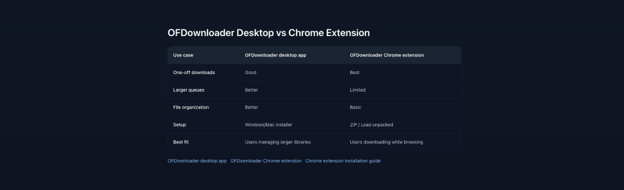
Chrome favors quick downloads while browsing; the desktop workflow favors larger libraries.
The comparison is more useful than a generic “best downloader” claim. The right option depends on the task:
- Choose Chrome for a few accessible posts, images, or short videos.
- Choose desktop for repeat backups, longer videos, multiple items, and structured storage.
- Test one file first before creating a large queue.
How to Install the Chrome Extension
The current Chrome workflow uses a ZIP package and Chrome’s Load unpacked feature.
Step 1: Download and Extract
Download the extension ZIP from the official publisher and extract it to a folder that will not be deleted. The extracted directory should contain manifest.json.
Step 2: Open Chrome Extensions
Enter chrome://extensions/ in the address bar, then enable Developer mode.
Step 3: Load the Folder
Click Load unpacked and select the extracted folder—not the ZIP file or an extra parent directory.
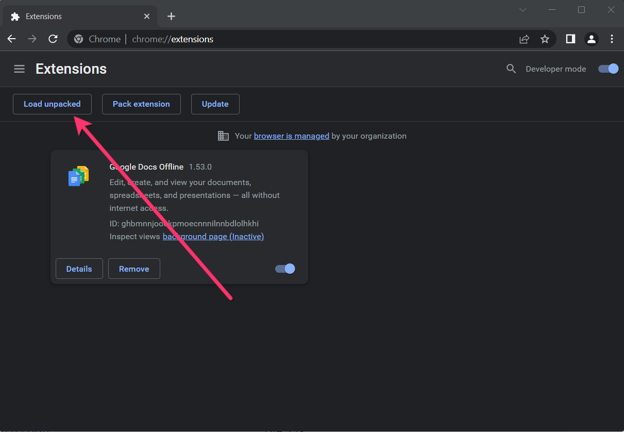
Developer mode reveals the Load unpacked button used for ZIP-based extension installation.
Step 4: Verify With One File
Pin the extension, open content the account is authorized to view, and let the page finish loading. Confirm that the download control appears, then test one non-critical file before saving more.
If Chrome reports that the manifest is missing, the wrong folder was selected. Choose the directory that directly contains manifest.json.
How to Use the Desktop Workflow
The desktop app is better suited to an authorized archive involving multiple items.
- Choose the correct installer. Download the Windows or macOS version from the official product page. Avoid mirrors and repackaged installers.
- Select storage. Use a drive with enough free space and create separate folders for different creators or projects.
- Confirm access. Sign in through the supported workflow and verify that the exact content plays normally.
- Build a small queue. Begin with one item; after it succeeds, add only the posts required for the archive.
- Verify the output. Open files from the beginning, middle, and end of the queue. Confirm video, audio, and filenames rather than trusting only a completed status.
A clear naming pattern makes the archive easier to audit:
creator_YYYY-MM-DD_post-title.ext
For professional work, record the source page, rights owner, date saved, and permission reference in a separate document.
What About Videos From Messages?
Message videos require an extra access check:
- Open the exact conversation with the authorized account.
- Confirm that the video already plays.
- Confirm that any required purchase has been completed.
- Let older messages finish loading.
- Test the individual item before attempting more.
- Keep the copy private unless the creator granted separate sharing rights.
A downloader should not unlock unpaid pay-per-view media. If the account shows a purchase prompt or cannot play the video, stop and resolve the access issue first.
Common Problems and Fixes
The Chrome Button Does Not Appear
Confirm that the extension is enabled, pinned, and allowed on the current page. Refresh after the video finishes loading. If the extracted folder was moved or deleted, reinstall the official package.
The Video Plays but Is Not Detected
Reload the exact post or message instead of staying on the creator profile. Confirm that the session is active, update the tool from its official source, and test one item. If Chrome remains unstable, use the desktop workflow rather than installing random extensions.
The File Is 0 KB or Will Not Play
Check disk space, keep the video page open, refresh the login session, and retry one file. Test the result in a current media player. If the failure continues, record the visible error and contact support.
Screen Recording Produces a Black Image
Black output may indicate protected playback or browser restrictions. It is not a reason to seek access-control bypass instructions. Confirm authorization and use a supported workflow for accessible content.
A Queue Stops Partway
Check the connection, free storage, device sleep settings, and login session. Resume with a smaller group instead of restarting the entire archive.
Pros and Limitations
Advantages
- Chrome, Windows, and macOS workflows.
- Quick browser option for individual items.
- Desktop option for larger queues and stronger organization.
- Documented ZIP installation process.
Limitations
- Chrome requires manual ZIP installation.
- Browser behavior can change after updates.
- Desktop use requires installation and local storage.
- Compatibility may vary by page type.
- No downloader can create access rights or guarantee every item will work.
Safety Checklist
Before downloading, confirm that:
- you created the content, own the rights, or have explicit permission;
- the signed-in account can already view the item;
- the workflow follows current platform rules and applicable law;
- the software came from the official publisher;
- no third-party site requests the platform password;
- the archive is protected against unauthorized access;
- files will not be reposted, resold, or shared without permission.
Copyright normally protects original videos from the moment they are created and fixed. Permission to view a work is not the same as ownership of its reproduction or distribution rights.
Frequently Asked Questions
Is an OnlyFans downloader legal?
There is no universal answer. It depends on ownership, permission, local law, intended use, platform terms, and any access controls. Download only material you created, own, or have explicit permission to save.
Does paying for a subscription permit downloading?
Not automatically. Payment provides the access described by the subscription or purchase; it does not necessarily transfer copyright.
Is Chrome or desktop better?
Use Chrome for a few individual items while browsing. Use desktop software for longer videos, repeat work, larger queues, or better folder organization.
Why do downloads stop working?
Typical causes include an expired session, browser or platform updates, insufficient disk space, a moved extension folder, or a change in media protection. Diagnose the failed step before switching tools.
Final Recommendation
Choose an OnlyFans downloader by workflow, not exaggerated promises. Chrome is the practical starting point for one accessible item. A desktop app makes more sense for a larger authorized library that needs a queue and organized local storage.
Whichever method is used, begin with permission, test one file, verify the output, protect the archive, and do not redistribute creator media. Software can simplify an authorized backup; it cannot turn unauthorized access into acceptable use.
References
- OnlyFans: Terms of Service
- S. Copyright Office: What Is Copyright?
- S. Copyright Office: Permission and Fair Use FAQ
This article provides general educational information and is not legal advice. OFDownloader and SaveMyDayApp are not affiliated with or endorsed by OnlyFans.

