

Tool management has a way of quietly bleeding small teams, freelancers, and contractors. What starts as a simple challenge… keeping track of shared gear, from power tools to A/V kits and lab equipment… turns into a daily pattern of “shadow costs” that no spreadsheet ever fully captures. A misplaced soldering iron isn’t just a missing asset; it slows the entire job.
Workers can lose over two hours a day hunting for gear, which becomes more than 25 hours of paid labor gone every week for a five-person team. Over time, this chaos creates ghost assets and a subtle hoarding culture. People stash tools because they don’t trust they’ll find them later. The company technically owns the equipment, yet has no real visibility into where anything is. Managers, stuck in the dark, buy replacements for tools that already exist.
All of it stems from one gap: the information about each tool never matches the reality on the ground. Tightening that gap can increase profits by as much as 20%.

Why Your Current Method Is a Liability
Faced with the costs of disorganization, most small teams turn to one of two solutions: the free spreadsheet or the expensive enterprise software. Both of these systems are flawed.
The Illusion of Control with Spreadsheets
A spreadsheet can only be in one place at a time. The moment a team member saves a local copy, emails a new version, or creates their own master list, the central file becomes corrupt. This is the outcome of a collaborative team using a non-collaborative tool.
Using spreadsheets, it’s impossible to cross-check information, and teams can quickly find themselves referencing multiple versions of the same document. Also, manual data entry is prone to mistakes. A typo or a missed entry can make a tool invisible to find. An asset ledger is a static list. A tool-tracking system must be a dynamic log of states (e.g., location, condition, user).
A spreadsheet can tell you where a tool was last week, but it cannot tell you where it is right now. They provide no safeguards, no real-time validation, and no automated workflows to reduce these errors.
The “Overkill” Enterprise Solution
Enterprise Asset Management (EAM) software is designed for the needs of large-scale manufacturing, IT departments, and CFOs, not for workers in a small team. Enterprise-grade inventory systems are expensive, with high monthly subscription fees and setup costs. Worse, they demand upfront investment in both capital and team-wide training time.
Additionally, data is difficult to input into EAMs and even more difficult to extract, creating data silos. The failure of EAM is the same as spreadsheets: the friction of using the system is greater than the pain of the original problem.
The AI-Powered Ledger
Small, agile teams need a “Goldilocks” solution: one that is as simple to use as a list but as powerful as a ledger.
The single greatest barrier to starting any new inventory system is the manual, time-consuming, and soul-crushing task of cataloging hundreds or thousands of existing tools and assets. A modern system must automate this. Second, the system must solve the problem of team adoption. Over 70% of software implementations will fail to meet expectations due to user adoption issues.
If a user has to download a specific app, create an account, or watch a 20-minute training video, the system will fail. The friction preventing adoption is too high. A modern system should be web-based and mobile-first, yet have powerful backend features. Most importantly, the technology must adapt to the user’s physical workflow.
From Hours to Minutes with AI Cataloging
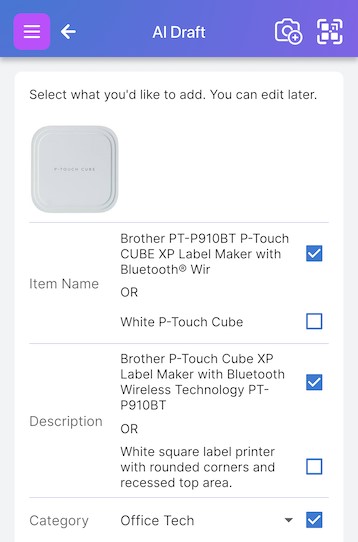
Scanlily’s AI-driven image recognition automates cataloging and tool tracking. While many competing systems remain fully manual, Scanlily uses AI to automatically recognize what is in a photograph, write a detailed description, and categorize the item.
On Scanlily, you can use the Single-Item AI Add for high-value assets, where you simply attach a QR sticker, scan it, photograph the item, and approve the AI-generated details in about 15 seconds.
For grouped items, you can use the “Magic” Add feature that catalogs entire containers or shelves from a single photograph, with the AI identifying and creating separate entries for multiple items at once. Both approaches drastically reduce the time and effort needed to maintain accurate inventory records.
True Team Accessibility with App-Less Scanning
One of the biggest points of failure for software adoption is app download. Users don’t want to download new, single-purpose apps. Scanlily’s app-less QR scanning is designed for zero-friction use.
The process is simple:
- Find the Item: you need to know what is in a box or what a piece of equipment is.
- Scan with Camera: You scan the Scanlily QR code using your phone’s camera app. There is no app to download.
- Tap the Link: A notification instantly pops up on your phone, and you tap it.
- View in Browser: The item’s public, view-only web page opens instantly on your phone’s default web browser.
The app-less model provides universal read access to non-core team members without compromising the write access of the core, logged-in team. A mover can scan a box and see a checklist of its contents. A client can scan a piece of equipment and see its public specs. But only a logged-in team member can update the item’s location, change its status, or check it out.
Workflows for High-Value Tools
A modern asset system must do more than just list what a team owns. It should track accountability, manage availability, schedule maintenance, and find lost items. Scanlily provides practical workflows for managing shared equipment.
Accountability & Scheduling
The platform allows you to find who has a tool at any time. In Checkout Mode you can set tools to available or checked out with auditable records.
Reservation Mode functions like a calendar-based room booking for high-demand assets. And finally, Reservation with Pickups Mode combines both by requiring your team members to scan the labels to activate reservations, creating time-stamped audit trails and preventing hoarding of tools.
Lifecycle & Maintenance Management
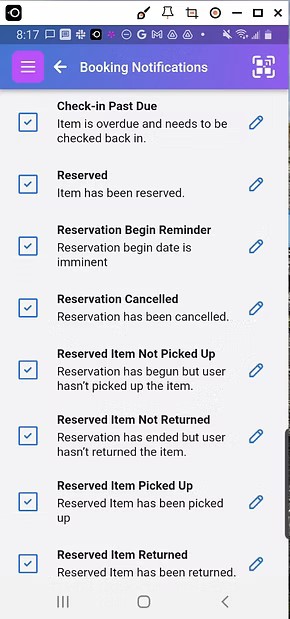
Scanlily also allows you to track the condition of your tools using instant status Flags (like “broken” or “needs inspection“) that alert team members. You can set reminders for scheduled preventative maintenance with email or push notifications and add custom attributes for more advanced tracking with dropdown values. The system integrates these features visually, for example, the GPS map pins turn red when a job site has flagged items.
Locating Assets
The platform combines passive GPS tagging with natural language AI search. Whenever a team member scans a QR label attached to a tool, Scanlily captures phone coordinates. Now, you can ask “Where’s my blue screwdriver?” or “What tools are in the toolbox?” and know where each tool is instantly.
Future-Proofing Your Team’s Inventory
The chaos and profit drain from poor tool tracking are systemic, costly, and, as we’ve shown, entirely solvable. The failure of other tools is their high-friction, anti-user design. Spreadsheets fail because they are static and error-prone. EAM systems fail because they are too complex, too expensive, and built for a different class of problem.
Scanlily, with its app-less, AI-driven model, is a solution that blends simple and powerful features. It solves the procrastination of switching tools with AI-driven cataloging and replaces bulky and costly software with app-less QR scanning.

Beyond its immediate advantages, Scanlily also offers data ownership and API access. Scanlily’s “Full Data Ownership and Bulk Export” allows users to back up all data and images, removing the risk of adoption. Their API also allows them to be integrated into accounting software, project management dashboards, or other enterprise systems, ensuring the system scales with the organization. Scanlily is a choice for any small-to-medium-sized team seeking to build a resilient, profitable, and future-proof operation.

