

The recovery phrase worked. The wallet opened. There was no error message, no rejected word, no warning about an invalid backup.
Then you looked at the balance: zero. The transaction history was empty too.
It’s an unpleasant moment, especially when you remember exactly how much ZEC you had. But those two empty fields don’t necessarily mean your money is gone. They may mean the application has recovered your keys and hasn’t yet recovered the information needed to display your funds.
Before trying another phrase or deleting the wallet, check what stage of restoration you’ve actually reached.
Opening a Wallet and Rebuilding Its Balance Are Different Jobs
A seed phrase gives the application the information needed to derive keys. It doesn’t contain a list of your transactions or a regularly updated balance.
Those records have to come from blockchain data. The software needs to identify relevant activity, account for funds received and spent, and build its local view of the wallet.
Think of restoration as three separate steps:
- Recover the relevant keys or viewing information.
- Obtain and process the necessary blockchain data.
- Calculate and display the resulting balance and history.
Completing the first step doesn’t automatically complete the others. Some wallets hide this distinction by displaying a loading screen. Others open the interface immediately, with a zero where an unknown or not-yet-calculated balance would be a more helpful description.
Until synchronization is complete, treat the displayed amount as provisional.
The First Synchronization Can Take Hours
A practical example is the first opening of an existing funded wallet in a fresh browser environment at https://zcashwallet.co/. The interface can initially show zero ZEC and no transactions. The user needs to start synchronization before the application can reconstruct the supported balance and transaction history.
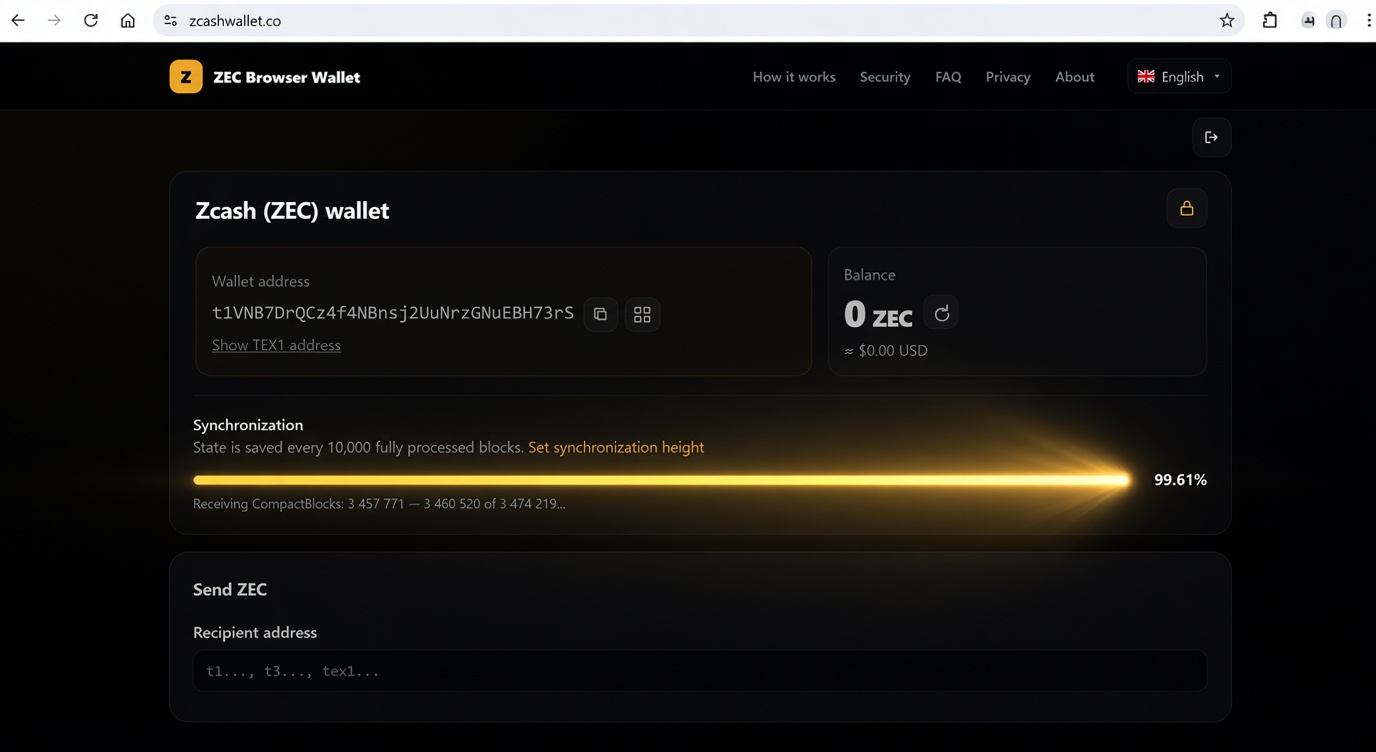
That initial process can take several hours. The delay doesn’t mean the seed phrase failed. It reflects the work still required to obtain and process the relevant blockchain history.
This isn’t a universal waiting time for Zcash wallets. Applications use different data sources and scanning methods. Some retrieve indexed transparent-address information quickly; others process a much larger historical range. Device performance, connection quality, server availability, and the amount of data being scanned all affect completion time.
A previously used browser may also have saved progress that a new browser profile lacks. Restoring on a different computer can therefore feel much slower than reopening the same wallet on your usual device.
An initially empty transaction list makes sense in this situation: the application hasn’t reconstructed the history yet. It isn’t evidence that the address has never received funds.
Check Whether Synchronization Is Moving
Waiting helps when work is progressing. It doesn’t fix a scan that never started or a connection that has failed.
Look for something measurable:
- A synchronization status showing that scanning is active.
- A processed block height that increases over time.
- A progress indicator advancing toward the current chain tip.
- Connection errors, repeated timeouts, or a paused state.
Check progress a few minutes apart rather than repeatedly refreshing the page. On a long first scan, the balance can remain unchanged while the processed height keeps rising.
If the wallet depends on an open browser tab, keep that tab available and avoid putting the device to sleep. Background tabs may be throttled or suspended. Whether a scan resumes from its last checkpoint depends on the application and its saved local data.
Repeatedly clearing browser storage can discard that progress. Don’t do it as your first troubleshooting step, especially if the browser also holds your only accessible wallet data.
If scanning is stuck, note the exact error and check the application’s connection or server options. A failed data source needs attention; another hour of waiting may accomplish nothing.
A Completed Scan Can Still Start Too Late
Some wallets ask for a wallet birthday, a date, or a starting block height. This tells the application where to begin looking.
Choose a point no later than the wallet’s earliest activity. Suppose you first received ZEC in 2021 but start scanning from 2024. The software may never examine the earlier receipt needed to reconstruct your funds correctly.
Reaching the current block height doesn’t prove that the historical starting point was correct.
If you know the first-use date, select a slightly earlier point. If you don’t know it, use the application’s documented full-history or earliest appropriate scanning option. That can take longer, but guessing a recent date to save time can produce an incomplete result.
Once you’ve corrected the starting point, use the wallet’s rescan function if available. Restarting the application alone may simply reopen the same incomplete local records.
When Waiting Longer Won’t Reveal the Funds
If synchronization has completed over the correct range, move on to what was actually restored. Several different problems can produce a convincing-looking empty wallet.
The Backup Covers a Different Account
A seed can generate multiple accounts and addresses. The original application may have displayed their combined funds, while the replacement initially opens only the first account.
A private key can have narrower coverage still. Importing the key for one transparent address doesn’t restore every other address in the old wallet.
Check any account selector and the original wallet’s backup notes. If you imported additional keys separately, those keys may not be included in the original seed’s recovery scope.
The Application Doesn’t Support the Relevant Funds
Zcash has transparent funds and shielded pools. An application supporting one doesn’t necessarily support all the others.
A successful transparent-address restoration won’t make unsupported shielded funds appear. You need software that can derive or import the relevant keys and scan the appropriate pool.
This distinction has caused real confusion. In one Reddit discussion about a zero balance after restoring Zcash, a user reported missing shielded funds after moving to another phone. The discussion considered scanning dates and address recovery. It illustrates the symptom, rather than proving one universal cause or fix.
The Words Open a Different Set of Keys
Most compatible restorations require nothing beyond entering the words. However, applications can use different rules for deriving keys, and accepting a phrase doesn’t establish that all expected accounts have been recovered.
An additional recovery passphrase matters too. If you originally used one, entering the words without it produces different keys. This isn’t the password used to unlock the application.
A known transparent address can help check the result, but remember that a wallet may use several addresses. A newly displayed receiving address alone isn’t conclusive evidence of an incorrect restore.
You’re Confusing Balance With Spending Access
A Unified Full Viewing Key can let compatible software calculate a supported account’s balance after scanning. It cannot authorize spending.
View-only access does not inherently mean zero balance. Conversely, seeing your funds doesn’t prove you’ve restored the ability to send them. Check whether the application is showing total funds, spendable funds, or a watch-only account.
Check Independent Evidence Before Assuming Theft
For transparent funds, a reputable Zcash block explorer can help verify activity associated with a known address or transaction ID. Check that you’re looking at Mainnet and the intended address.
Shielded funds aren’t publicly inspectable in the same way. Finding a shielded transaction doesn’t reveal your private account balance. That requires the appropriate wallet keys and scanning support.
If the old installation still works, preserve it and compare its accounts and records. Don’t send a test payment merely to force the replacement to update. Sending coins isn’t a required activation step for restored funds.
An unexplained outgoing transaction deserves investigation. A blank interface by itself doesn’t establish that one occurred.
Work Through the Problem in Order
A useful checklist keeps you from changing several things at once:
- Confirm that synchronization has started and is advancing.
- Let it finish, keeping the device and connection available as required.
- Verify that the scan begins early enough.
- Check account coverage, pool support, and any additional passphrase.
- Compare available evidence without deleting the original files.
Before making destructive changes, ensure you have a complete backup and any required passwords. Never give a recovery phrase or private key to someone claiming they can fix the balance.
The number zero can describe an empty wallet, an unfinished scan, or an incomplete restoration. Find out which one you’re looking at before deciding what happened to your ZEC.

