

While Genshin Impact is free to play, many players will spend some currency in the game called Genesis Crystals. Most errors while checking out are due to incorrect server selection, incorrect UID entry and incorrect payment page. Because the game is available on multiple platforms, it can be confusing to work out which server your account is on and therefore where you should be purchasing from. This guide will explain how UIDs and servers work, how to check that your information is correct, and how to keep your account and payments secure. It will also explain how third party services such as LootBar fit into this.

One Game, Several Platforms
Genshin Impact is available on Windows, iOS, Android, PlayStation 5, and Xbox Series X|S. The PlayStation 4 version has been retired: HoYoverse ended support on April 8, 2026, and had already discontinued in-game purchases on that platform on February 25, 2026. The game also supports cross-platform play, so friends on different devices can team up in co-op.
What matters for top-ups is that your progress belongs to your HoYoverse account and your character’s UID, not to a device. If you play on a phone and a PC with the same account, you’re topping up the same character either way. If you ever have trouble working out which account or platform you’re on, check the UID in-game before you spend anything.
Understand UID and Server Before You Pay
What your UID is
Your UID is the number that identifies your character. It’s a permanent 9-digit number on most servers, and newer Asia server accounts have 10-digit UIDs. You can find it in the game, and it’s the one detail a UID-based top-up needs, because it identifies where the crystals should go without exposing your login.
How the first digit shows your server
Genshin Impact has four global servers, and the start of your UID tells you which one your character is on. Several top-up guides and community answers agree on the same pattern.
| UID starts with | Server |
| 6 | America |
| 7 | Europe |
| 8 or 18 | Asia |
| 9 | TW, HK, MO (Taiwan, Hong Kong, Macao) |
A few guides list the digits differently, so treat the table as a quick check and confirm the server shown on your game’s login screen before you pay.
Regional accounts
A single HoYoverse account can have a separate character on each server, which means one login can own more than one UID. Each of those characters is its own save with its own progress and its own currency. That’s why picking the right server matters: a UID only means something on the server where it was created, and a top-up for the America server can’t be delivered to your Asia character.
What You’re Actually Buying
Genesis Crystals are the game’s premium currency. You buy them with real money and exchange them for Primogems, the currency used to make Wishes on the gacha banners. Primogems can also be earned through play, so spending is optional.
It’s also worth knowing that in 2025, the U.S. Federal Trade Commission announced a $20 million settlement with Cognosphere (HoYoverse) over loot boxes and misleading players about odds. Under the settlement, the company was required to disclose exchange rates for multi-tiered virtual currency, and to avoid selling loot boxes to teens under 16 without parental consent. In practice, that means you should be able to see what a purchase is worth before you pay, so check it.
Completing a Top-Up Without Sharing Your Password
Start with official channels
The in-game shop and HoYoverse’s official top-up center are the most familiar routes, and they use your platform’s payment system or HoYoverse’s checkout. Whichever store you use, a UID-based top-up only needs your UID and server.
Verify before you pay
Whichever route you choose, the same checks apply:
- Open the game and read your UID directly from the screen instead of typing it from memory.
- Match the UID’s first digit to the server table above, and confirm it against the server shown at login.
- Re-enter the UID slowly and compare each digit before you confirm.
- Check the pack size and price before paying.
- Screenshot the order confirmation so you can show it to support if something goes wrong.
Above all, a UID-based top-up should only ever ask for your UID and server. If a page asks for your HoYoverse password, a verification code, or a login link, close it.
Where LootBar fits
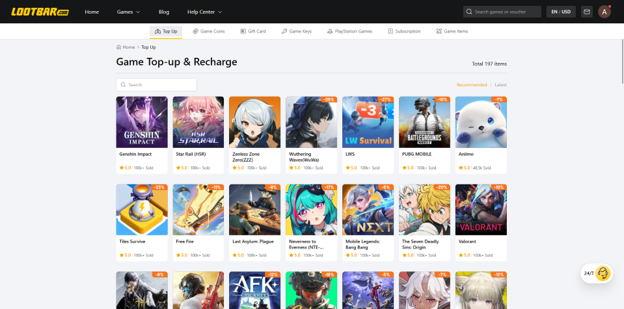
If you want another way to buy Genesis Crystals, a genshin top up on LootBar works the same way as the official UID top-up: you enter your UID and select your server, with no password or login needed. Delivery comes with a 3-minute guarantee, and because the crystals go straight to your UID, the first-purchase double bonus still applies when it’s available. If you play other games too, the LootBar top-up page covers many more titles.
Mobile Payment Security
Watch for phishing
Account theft usually starts with phishing. Bind your account to an email and phone number, and keep 2-step verification on for new devices. Watch out for these signs of fraud:
Be suspicious of any site, message, or “agent” that asks for your password or a verification code, pushes you to act fast, or sends a link through a direct message. A genuine top-up never needs your password, and you should never forward a verification code to anyone.
Protect the payment itself
On a phone, pay through your app store or payment app with a passcode or biometric check turned on, and avoid entering card details on pages you reached through links in messages. Keep your receipts and check your statements for charges you don’t recognize.
Refunds and chargebacks
If you see a charge you didn’t make, contact the support team of the store you paid through, and include the transaction details, the UID it went to and what went wrong. Only use a chargeback for charges you genuinely didn’t make, and contact support first, because disputing a real purchase can lead to the currency being removed from your account.
Common Mistakes and How to Avoid Them
| Mistake | What can happen | How to avoid it |
| Choosing the wrong server | The order fails or can’t be delivered to your character | Match the UID’s first digit to the server and check the login screen |
| Mistyping the UID | The order fails or goes to another player’s account | Copy the UID from the game and compare each digit |
| Mixing up UID and HoYoverse account | The top-up can’t find your character | Use the in-game UID, not your login or email |
| Sharing your password | Your account can be taken over | Never give a password to anyone |
| Forwarding a verification code | Someone else can log in as you | Treat every code as private |
| Using the wrong account on a shared device | The order goes to the wrong character | Confirm which account is logged in before you pay |
| Disputing a payment you made | Currency can be deducted and penalties can follow | Contact support first |
Conclusion
Topping up in Genshin Impact is simple once you know your UID, your server, and what you’re paying for. Read your UID from the game, match it to the right server, never share your password or a verification code, and keep proof of every purchase. Whether you top up in-game, through HoYoverse’s top-up center or through a UID-based store like LootBar, the checks are the same: the right UID, the right server and the right pack. Taking two minutes to check will save you from a purchase you can’t undo.

